Besides translating your store’s built-in content, Transtore also supports translating content created by third-party Shopify apps (such as Review Apps, Page Builders, Badges, Upsell Tools, etc.)
This helps ensure a consistent multilingual experience across your entire storefront.
I. What Is Third-Party App Content?
Third-party app content refers to text that is added to your store by apps other than Shopify’s default features, for example:
- Product reviews and ratings
- Trust badges or labels
- Subscription or upsell messages
- Custom sections from page builder apps
Since this content is not part of Shopify’s native structure, it needs to be handled separately from standard product or page translations.
II. How Transtore Translates Third-Party App Content
Transtore supports automatic translation for content generated by third-party Shopify apps. Because this content is dynamically generated by external apps, it cannot be edited manually inside Transtore.
Instead, Transtore applies AI translation in real time to ensure the content displays correctly in your customers’ selected language.
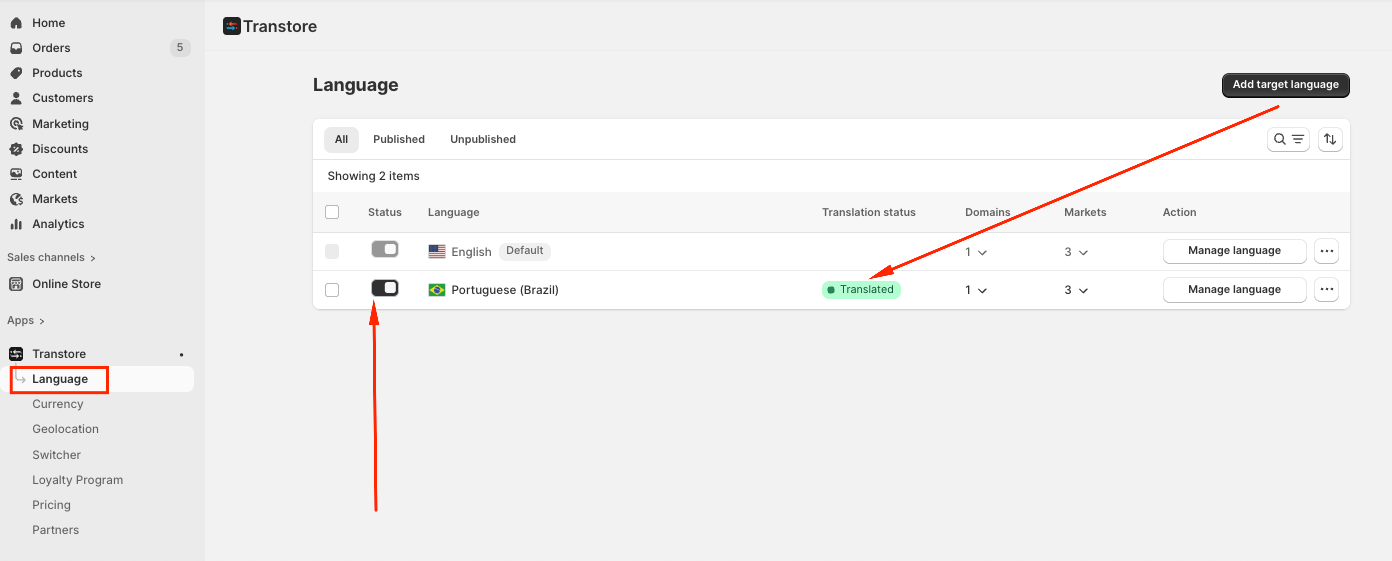
After you add the Target language in our app, please publish the language and the status shows as “Translated”, then the contents from the third-party app will be translated automatically:
III. Important Notes
Third-party app content is translated automatically only
Manual editing is not supported for this content type
If the original text in the app changes, Transtore will update the translation automatically
Some third-party app content may not be translatable if it is built using iframes or hard-coded with CSS or custom scripts.
If you need further assistance, please contact us at support@transtore.app or submit a ticket here.
Was this article helpful?
That’s Great!
Thank you for your feedback
Sorry! We couldn't be helpful
Thank you for your feedback
Feedback sent
We appreciate your effort and will try to fix the article