Customizing the language flags on your store’s language switcher helps create a more personalized and professional experience for international visitors. Transtore makes it simple to adjust the flags so they accurately represent each language and align with your brand identity.
Steps to Customize Your Language Flags:
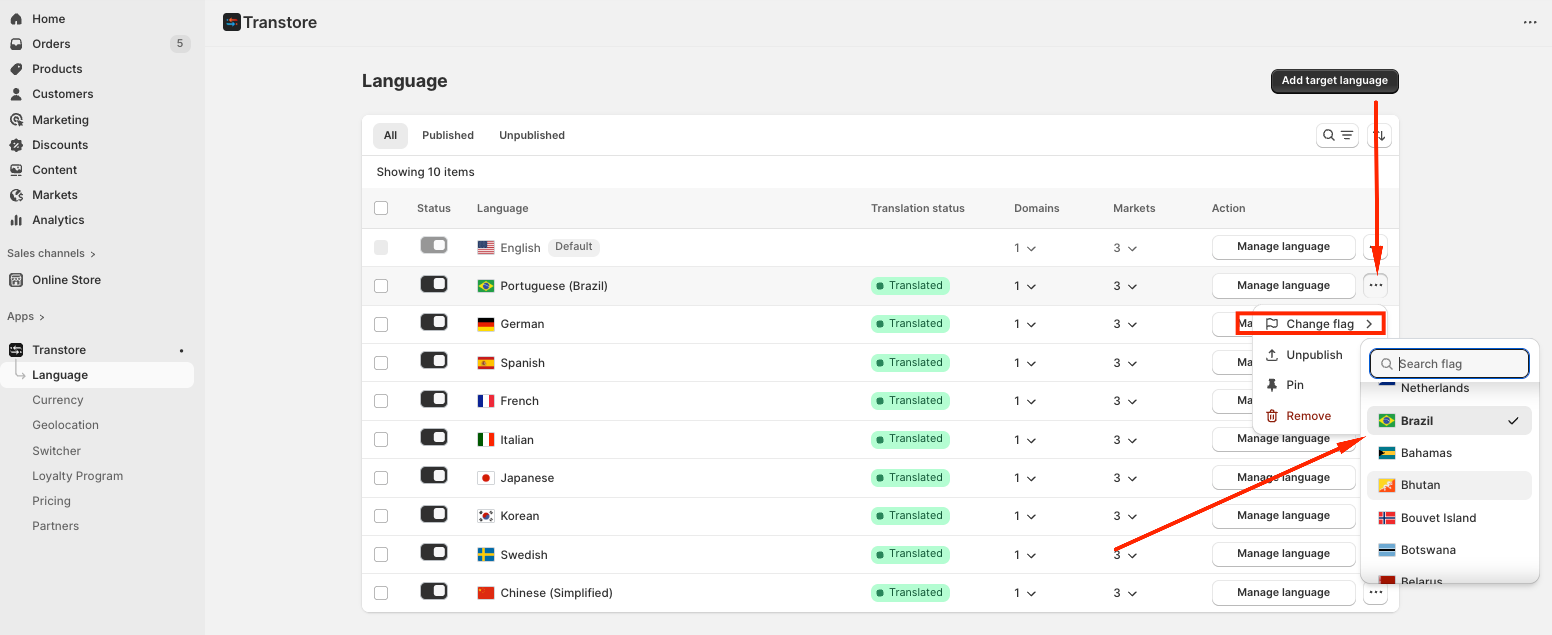
Navigate to "Language" in your Transtore dashboard.
Click the three dots next to the language you want to edit.
Select "Change Flag".
Choose the flag that best represents the language or country.
By customizing your language switcher, you ensure that your multilingual store is visually consistent, intuitive, and welcoming for visitors from around the world. These small adjustments can significantly enhance user experience and help your international customers navigate your store with ease.
If you need further guidance or have any questions, don't hesitate to reach out to our support team via email at support@transtore.app or submit a ticket here. We'd be happy to help!
Was this article helpful?
That’s Great!
Thank you for your feedback
Sorry! We couldn't be helpful
Thank you for your feedback
Feedback sent
We appreciate your effort and will try to fix the article